This Machine Prints on Literally Anything — I Had to Try It
Chris Piascik@chris-piascikThis Machine Prints on Literally Anything — I Had to Try It
- Views
- 224K
- Likes
- 3.6K
- Comments
- 176
- Topics
Analysis
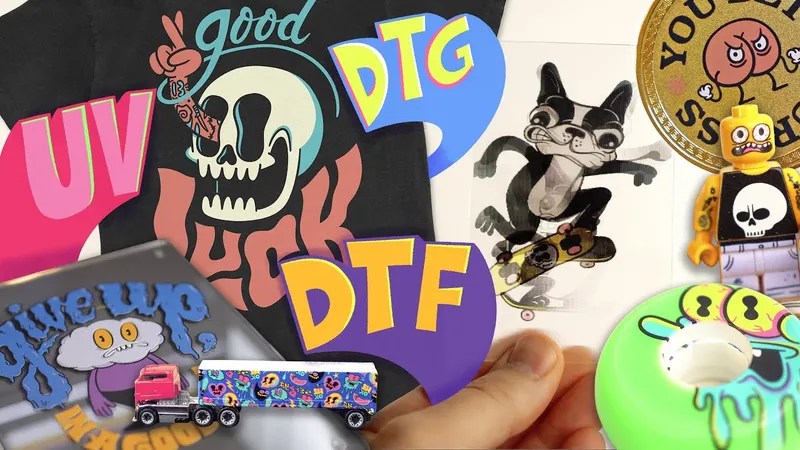
This is the best. I want to print on everything. I've been really excited about making this video for a while. I just got done setting up the XTool Omni Printer. And if you don't know what it is, it is a magical unit that does UV printing and a lot of other technical stuff that I'm not really going to talk That's not what this video is about. This video is about making stuff, showing you what's possible, taking your art from living on an iPad or whatever, and putting on some real stuff, maybe making some mistakes, probably making a bunch of cool stuff. The gist of the Omni Printer is that it'll print on nearly anything from rigid materials to fabric. I I honestly feels like magic to me. And the other thing that I'm excited about is it's got a very sophisticated like built-in scanning situation so that it'll like automatically show you what you have and it This one even like finds the object and shows it to you and then you can like layer art directly on it in the XTool software. I'm not going to go too far into the setup stuff. Uh I'll show a little bit of some quick B-roll, but honestly, it was pretty straightforward. I unboxed it and just followed the instructions. Took me not that much time. I had it up and running very quickly. And if we're being honest, there's a a bunch of other videos on YouTube showing people unboxing it and going over all the technical details. And that's that's not that's not my That's not what we're going to do. We're going to have This is a We're in the fun zone here. So, if you want that stuff, you could go watch one of those videos. And honestly, a lot of those videos, I'll be honest with you. A lot of these creators doing these videos are just taking this like AI slop and putting it on stuff and it's a crying shame. We're going to make stuff with real artwork. Weird artwork, but my artwork. Let's make some stuff. I'm excited. Are you excited? Cuz I'm excited. Let's go.
- 01The Excited Opening
Open with an immediate burst of personal excitement, then state a broad desire to use the featured tool everywhere.
OriginalThis is the best. I want to print on everything. I've been really excited about making this video for a while.
- 02The Setup and Selective Reveal
Introduce the tool, describe it in almost magical terms, and deliberately refuse to explain every technical detail. This signals that the video has a different purpose.
OriginalI just got done setting up the XTool Omni Printer. And if you don't know what it is, it is a magical unit that does UV printing and a lot of other technical stuff that I'm not really going to talk That's not what this video is about.
- 03The Creative Promise
Define the real experience: use the tool to turn digital or imagined ideas into physical objects, while leaving room for mistakes and exciting results.
OriginalThis video is about making stuff, showing you what's possible, taking your art from living on an iPad or whatever, and putting on some real stuff, maybe making some mistakes, probably making a bunch of cool stuff.
- 04The Capability Tease
Highlight the tool's unusually broad range and one distinctive feature that makes the experiment feel almost magical.
OriginalThe gist of the Omni Printer is that it'll print on nearly anything from rigid materials to fabric. I I honestly feels like magic to me. And the other thing that I'm excited about is it's got a very sophisticated like built-in scanning situation so that it'll like automatically show you what you have and it This one even like finds the object and shows it to you and then you can like layer art directly on it in the XTool software.
- 05The Anti-Tutorial Pivot
Briefly acknowledge the standard setup and technical content, then dismiss it as unnecessary because the main value is the hands-on experiment.
OriginalI'm not going to go too far into the setup stuff. Uh I'll show a little bit of some quick B-roll, but honestly, it was pretty straightforward. I unboxed it and just followed the instructions. Took me not that much time. I had it up and running very quickly. And if we're being honest, there's a a bunch of other videos on YouTube showing people unboxing it and going over all the technical details. And that's that's not that's not my That's not what we're going to do.
- 06The Originality Challenge
Position the video as a more entertaining alternative to generic demonstrations. Criticize bland or automated examples, then promise personal and unusual creations.
OriginalWe're going to have This is a We're in the fun zone here. So, if you want that stuff, you could go watch one of those videos. And honestly, a lot of those videos, I'll be honest with you. A lot of these creators doing these videos are just taking this like AI slop and putting it on stuff and it's a crying shame. We're going to make stuff with real artwork. Weird artwork, but my artwork.
- 07The Energizing Transition
End the intro with a direct invitation, repeated excitement, and a clear launch into the experiment.
OriginalLet's make some stuff. I'm excited. Are you excited? Cuz I'm excited. Let's go.