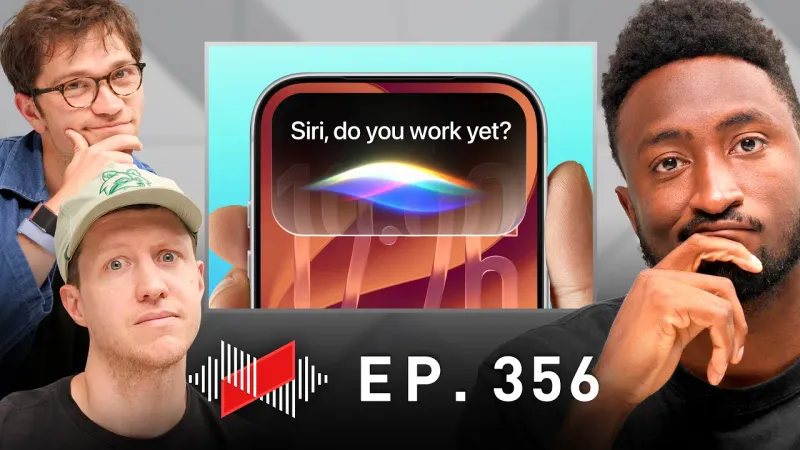
WWDC 2026: Is Siri Actually Good Now?
WVFRM Podcast@WaveformWWDC 2026: Is Siri Actually Good Now?
Waveform’s hosts discuss Apple’s WWDC announcements, including updates to Siri, iOS, macOS, and visionOS, alongside other tech stories and nostalgic gaming topics. The episode opens with a humorous discussion of confusingly similar YouTube and YouTube TV app icons; its chapter list also signals trivia near the end.
- Views
- 410K
- Likes
- 8.3K
- Comments
- 1.2K
- Apple WWDC announcementsSiri AI updatesApple software featuresTech news and nostalgia
Analysis
Waveform’s hosts discuss Apple’s WWDC announcements, including updates to Siri, iOS, macOS, and visionOS, alongside other tech stories and nostalgic gaming topics. The episode opens with a humorous discussion of confusingly similar YouTube and YouTube TV app icons; its chapter list also signals trivia near the end.
- Podcast episodeCo hosted conversation
- Title
- WWDC 2026: Is Siri Actually Good Now?
I just want to say it. The Xbox 25th 5th anniversary Xbox Series X25 in transparent green is the name of [laughter] >> They're calling it the Xbox Series X25. >> I said Xbox like four times. [laughter] >> Xbox X25. Xbox Series. >> Yo, what is up people of the internet? Welcome back to another episode of the Waveform Podcast. We're your hosts. I'm Marquez. >> I'm Andrew. >> I'm David. And this week was WWDC week from Apple. So, of course, we'll be talking about that quite a bit. New software, new AI, a lot of a lot of thoughts, maybe some hot takes, old Siri. Uh but maybe some other stuff, too. We've got uh potentially a couple of nostalgic video game stories. You know how I feel about nostalgia. >> Backyard baseball. >> Yep. Yeah. [laughter] >> Pick it and choose it. >> It's always going to come up. Um by the way, if you're a new listener, just trying to hear what happened at Dubdub, hit that subscribe button. We talk about all the newest tech stories every week. So, of course, whenever the next big show is, we'll be talking about that, too. Get subscribed so you hear that ASAP when it drops. Audio versions like 5 in the morning or something crazy. You get to listen on no matter what time you commute. >> Even ASAP. >> Yeah. So, but first, did they even test this? >> Does anybody have a dig? >> Oh, yeah. This was my turn. Okay. So, >> my did they even test this is I think it is a universal experience. If you have the services that I have, which is a weird way to phrase this, >> you get like 14 people >> on the Apple TV. If you have YouTube downloaded and you also have YouTube TV downloaded, >> Mhm. >> I am one of those people that like to put related things together. So, I will sit there and rearrange my icons, rearrange the apps, everything to put them together. So, I was like, "Oh, YouTube and YouTube TV. I'll put them together." They have like the exact same icon, and it is so confusing. And every time I'm trying to pick one, I accidentally pick the other one. The only difference is that one is in light mode, one is in dark mode, and the YouTube TV one says TV at the end of it. >> But like besides that, they look exactly the same. So there's been so many times that like just my fiance will sit down and try to go to YouTube and she'll accidentally pick YouTube TV. Or I will try to pick YouTube TV and I'll just like not really thinking about it pick YouTube and I'm like they need slightly different icons. Give me >> or hear me out, you just go to YouTube and they have a tab that says TV and then it >> kind of assumed that's what it was. I think that's only on >> I could be wrong. I think that's on other like Roku or something like that because Roku and them didn't have a deal. Something like that. I forget. >> But why don't they just do I'll tell you Apple TV. There is an app for it. >> I have the iPad YouTube app and the YouTube TV app and I regularly they are almost exactly the same icon as well just with a little TV at the bottom. So I also sometimes hit the wrong one. >> Oh yeah, this might just be just an app thing.
- 01Cold-open banter and show identification
The banter provides a light entrance, while the welcome establishes the recurring show before the week’s subject preview.
A brief joke about a product name gives way to the hosts welcoming listeners and identifying the podcast.
“I just want to say it. The Xbox 25th 5th anniversary Xbox Series X25 in transparent green is the name of [laughter] >> They're calling it the Xbox Series X25. >> I said Xbox like four times. [laughter] >> Xbox X25. Xbox Series. >> Yo, what is up people of the internet? Welcome back to another episode of the Waveform Podcast. We're your hosts. I'm Marquez. >> I'm Andrew. >> I'm David.”
- 02Episode topic preview
This roadmap tells listeners what the episode may cover and gives the Siri subject a brief mention, without yet making a claim about its quality.
The hosts introduce the week’s event and outline its expected discussion topics, including software, AI, Siri and other possible stories.
“And this week was WWDC week from Apple. So, of course, we'll be talking about that quite a bit. New software, new AI, a lot of a lot of thoughts, maybe some hot takes, old Siri. Uh but maybe some other stuff, too. We've got uh potentially a couple of nostalgic video game stories. You know how I feel about nostalgia. >> Backyard baseball. >> Yep. Yeah. [laughter] >> Pick it and choose it. >> It's always going to come up.”
- 03Listener subscription invitation
This is a direct subscription appeal and a practical description of the show’s publishing and listening routine; it remains part of the opening before the anecdote begins.
A host asks new listeners to subscribe, describes the show’s weekly coverage and mentions when audio versions may be available.
“Um by the way, if you're a new listener, just trying to hear what happened at Dubdub, hit that subscribe button. We talk about all the newest tech stories every week. So, of course, whenever the next big show is, we'll be talking about that, too. Get subscribed so you hear that ASAP when it drops. Audio versions like 5 in the morning or something crazy. You get to listen on no matter what time you commute. >> Even ASAP. >> Yeah.”
- 04Question and anecdote setup
The pointed question opens a small unresolved issue, while the qualification sets up a personal example without claiming it applies to everyone.
The hosts ask whether a product was tested, then introduce a speaker’s turn and qualify the coming experience as potentially familiar to people with a similar set of services.
“So, but first, did they even test this? >> Does anybody have a dig? >> Oh, yeah. This was my turn. Okay. So, >> my did they even test this is I think it is a universal experience. If you have the services that I have, which is a weird way to phrase this, >>”
- 05Similar icons, repeated mix-ups
The specific, repeated mix-up makes the anecdote concrete and relatable. Its central contrast is between two services that look almost the same and the different destinations the user intends to open. The excerpt cuts off during an additional app example, so the introduction boundary is limited by the supplied ledger.
The speaker explains that YouTube and YouTube TV can appear together on a device, describes rearranging the apps, and recounts repeatedly mistaking one for the other. Other speakers add brief suggestions and qualifications.
you get like 14 people >> on the Apple TV. If you have YouTube downloaded and you also have YouTube TV downloaded, >> Mhm. >> I am one of those people that like to put related things together. So, I will sit there and rearrange my icons, rearrange the apps, everything to put them together. So, I was like, "Oh, YouTube and YouTube TV. I'll put them together." They have like the exact same icon, and it is so confusing. And every time I'm trying to pick one, I accidentally pick the other one. The only difference is that one is in light mode, one is in dark mode, and the YouTube TV one says TV at the end of it. >> But like besides that, they look exactly the same. So there's been so many times that like just my fiance will sit down and try to go to YouTube and she'll accidentally pick YouTube TV. Or I will try to pick YouTube TV and I'll just like not really thinking about it pick YouTube and I'm like they need slightly different icons. Give me >> or hear me out, you just go to YouTube and they have a tab that says TV and then it >> kind of assumed that's what it was. I think that's only on >> I could be wrong. I think that's on other like Roku or something like that because Roku and them didn't have a deal. Something like that. I forget. >> But why don't they just do I'll tell you Apple TV. There is an app for it. >> I have the iPad YouTube app and the YouTube TV app and I regularly they are almost exactly the same icon as well just with a little TV at the bottom. So I also sometimes hit the wrong one. >> Oh yeah, this might just be just an app thing.