iOS 26.2 is here - the 10 BEST new things your iPhone can do!
Proper Honest Tech@ProperHonestTechiOS 26.2 is here - the 10 BEST new things your iPhone can do!
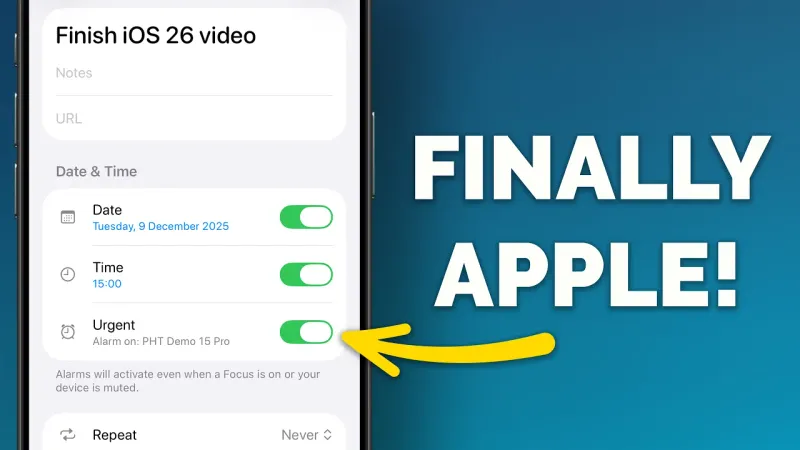
The video highlights 10 features and changes in iOS 26.2, from urgent Reminders and AirDrop changes to updates for Podcasts, Music, Freeform, Sleep, and News. The opening explains how urgent reminders can trigger an iPhone alarm at a chosen time; the other features are listed in the supplied chapters.
- Views
- 489.6K
- Likes
- 12.1K
- Comments
- 349
- IOS 26.2 FeaturesIPhone RemindersApple software updates
Analysis
The video highlights 10 features and changes in iOS 26.2, from urgent Reminders and AirDrop changes to updates for Podcasts, Music, Freeform, Sleep, and News. The opening explains how urgent reminders can trigger an iPhone alarm at a chosen time; the other features are listed in the supplied chapters.
- ListicleExplainer

- Title
- iOS 26.2 is here - the 10 BEST new things your iPhone can do!
“As I release this video, iOS 26.2 is As I release this video, iOS 26.2 is As I release this video, iOS 26.2 is available to download on compatible available to download on compatible available to download on compatible iPhones. Now, if you know much about iOS iPhones. Now, if you know much about iOS iPhones. Now, if you know much about iOS releases, the odd number point releases, releases, the odd number point releases, releases, the odd number point releases, so 26.1 for example, are usually just so 26.1 for example, are usually just so 26.1 for example, are usually just bug fixes. It's the even number point bug fixes. It's the even number point bug fixes. It's the even number point fixes, like this one, that usually fixes, like this one, that usually fixes, like this one, that usually contain a bunch of new features. And contain a bunch of new features. And contain a bunch of new features. And this release is no different. There are this release is no different. There are this release is no different. There are a number of really interesting quality a number of really interesting quality a number of really interesting quality of life improvements across all areas of of life improvements across all areas of of life improvements across all areas of iOS. And in this short video, I'm going iOS. And in this short video, I'm going iOS. And in this short video, I'm going to show you the ones that I think are to show you the ones that I think are to show you the ones that I think are most interesting. Okay, let's get into most interesting. Okay, let's get into most interesting. Okay, let's get into it. Apple has added a really good it. Apple has added a really good it. Apple has added a really good feature to the reminders app. So now feature to the reminders app. So now feature to the reminders app. So now when you create a new reminder, you'll when you create a new reminder, you'll when you create a new reminder, you'll see that there is a new toggle switch see that there is a new toggle switch see that there is a new toggle switch that you can switch on in the date and that you can switch on in the date and that you can switch on in the date and time section called urgent. When you time section called urgent. When you time section called urgent. When you toggle this on, it will force you to toggle this on, it will force you to toggle this on, it will force you to input a date and a time for your input a date and a time for your input a date and a time for your reminder. The difference here is that reminder. The difference here is that reminder. The difference here is that when the time arrives for your reminder when the time arrives for your reminder when the time arrives for your reminder to be completed instead of just flashing to be completed instead of just flashing to be completed instead of just flashing up on the screen as a notification, an up on the screen as a notification, an up on the screen as a notification, an alarm will go off on your iPhone like alarm will go off on your iPhone like alarm will go off on your iPhone like the alarm that you set in the morning. the alarm that you set in the morning. the alarm that you set in the morning.”
- 01Release and distinction
Establishes the subject and gives a reason this release may differ from expectations, setting up the roundup without treating the general claim as independently verified.
The speaker names the software release, notes its availability, and contrasts the usual role of odd- and even-numbered releases before claiming this one includes new features.
“As I release this video, iOS 26.2 is As I release this video, iOS 26.2 is As I release this video, iOS 26.2 is available to download on compatible available to download on compatible available to download on compatible iPhones. Now, if you know much about iOS iPhones. Now, if you know much about iOS iPhones. Now, if you know much about iOS releases, the odd number point releases, releases, the odd number point releases, releases, the odd number point releases, so 26.1 for example, are usually just so 26.1 for example, are usually just so 26.1 for example, are usually just bug fixes. It's the even number point bug fixes. It's the even number point bug fixes. It's the even number point fixes, like this one, that usually fixes, like this one, that usually fixes, like this one, that usually contain a bunch of new features. And contain a bunch of new features. And contain a bunch of new features. And this release is no different. There are this release is no different. There are this release is no different. There are a number of really interesting quality a number of really interesting quality a number of really interesting quality of life improvements across all areas of of life improvements across all areas of of life improvements across all areas of iOS.”
- 02Curated roundup promise
Turns the release framing into a clear viewing commitment: a selection of notable additions, filtered through the speaker's judgment.
The speaker promises to show the additions they personally consider most interesting and transitions into the first item.
“And in this short video, I'm going iOS. And in this short video, I'm going iOS. And in this short video, I'm going to show you the ones that I think are to show you the ones that I think are to show you the ones that I think are most interesting. Okay, let's get into most interesting. Okay, let's get into most interesting. Okay, let's get into it.”
- 03First feature introduction
Starts fulfilling the promised roundup with a concrete example. The brief description of the reminder's behavior remains introductory context; the opening ends before a sustained feature walkthrough.
The speaker introduces a new feature in the Reminders app and begins explaining how to set it up and what it changes when the reminder time arrives.
“Apple has added a really good it. Apple has added a really good it. Apple has added a really good feature to the reminders app. So now feature to the reminders app. So now feature to the reminders app. So now when you create a new reminder, you'll when you create a new reminder, you'll when you create a new reminder, you'll see that there is a new toggle switch see that there is a new toggle switch see that there is a new toggle switch that you can switch on in the date and that you can switch on in the date and that you can switch on in the date and time section called urgent. When you time section called urgent. When you time section called urgent. When you toggle this on, it will force you to toggle this on, it will force you to toggle this on, it will force you to input a date and a time for your input a date and a time for your input a date and a time for your reminder. The difference here is that reminder. The difference here is that reminder. The difference here is that when the time arrives for your reminder when the time arrives for your reminder when the time arrives for your reminder to be completed instead of just flashing to be completed instead of just flashing to be completed instead of just flashing up on the screen as a notification, an up on the screen as a notification, an up on the screen as a notification, an alarm will go off on your iPhone like alarm will go off on your iPhone like alarm will go off on your iPhone like the alarm that you set in the morning. the alarm that you set in the morning. the alarm that you set in the morning.”