This Machine Prints on Literally Anything — I Had to Try It
Chris Piascik@chris-piascikThis Machine Prints on Literally Anything — I Had to Try It
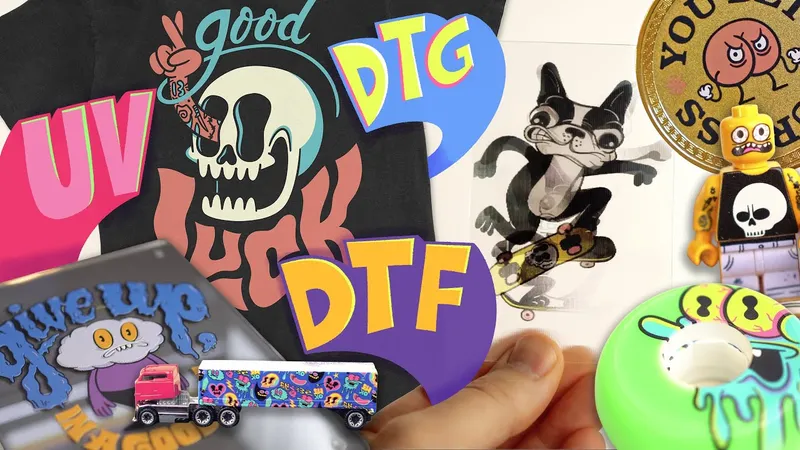
An artist tests the xTool O1 Omni Printer by transferring original artwork from a digital sketch onto varied surfaces, including acrylic, wood, fabric, toys, coins and a skate wheel. The video focuses on trying creative print applications and showing the results, with some experiments not working as planned.
- Views
- 224K
- Likes
- 3.6K
- Comments
- 176
- UV printer testingPrinting on Unusual MaterialsCustom artwork printingXTool Omni Printer
Analysis
An artist tests the xTool O1 Omni Printer by transferring original artwork from a digital sketch onto varied surfaces, including acrylic, wood, fabric, toys, coins and a skate wheel. The video focuses on trying creative print applications and showing the results, with some experiments not working as planned.
- DemonstrationProduct showcaseExperiment
- Title
- This Machine Prints on Literally Anything — I Had to Try It
“[music] >> This is the best. I want to print on everything. I've been really excited about making this video for a while. I just got done setting up the XTool Omni Printer. And if you don't know what it is, it is a magical unit that does UV printing and a lot of other technical stuff that I'm not really going to talk That's not what this video is about. This video is about making stuff, showing you what's possible, taking your art from living on an iPad or whatever, and putting on some real stuff, maybe making some mistakes, probably making a bunch of cool stuff. The gist of the Omni Printer is that it'll print on nearly anything from rigid materials to fabric. I I honestly feels like magic to me. And the other thing that I'm excited about is it's got a very sophisticated like built-in scanning situation so that it'll like automatically show you what you have and it This one even like finds the object and shows it to you and then you can like layer art directly on it in the XTool software. I'm not going to go too far into the setup stuff. Uh I'll show a little bit of some quick B-roll, but honestly, it was pretty straightforward. I unboxed it and just followed the instructions. Took me not that much time. I had it up and running very quickly. And if we're being honest, there's a a bunch of other videos on YouTube showing people unboxing it and going over all the technical details. And that's that's not that's not my That's not what we're going to do. We're going to have This is a We're in the fun zone here. So, if you want that stuff, you could go watch one of those videos. And honestly, a lot of those videos, I'll be honest with you. A lot of these creators doing these videos are just taking this like AI slop and putting it on stuff and it's a crying shame. We're going to make stuff with real artwork. Weird artwork, but my artwork. Let's make some stuff. I'm excited. Are you excited? Cuz I'm excited. Let's go.”
- 01Introduce the tool and broad capability
Establishes the central subject and the capability the coming video will explore.
The speaker expresses enthusiasm, identifies the tool, and describes its broad capability in expansive terms.
“[music] >> This is the best. I want to print on everything. I've been really excited about making this video for a while. I just got done setting up the XTool Omni Printer. And if you don't know what it is, it is a magical unit that does UV printing and a lot of other technical stuff that I'm not really going to talk That's not what this video is about.”
- 02Define the episode’s focus and scope
Turns the broad capability claim into a practical, exploratory premise, with room for both mishaps and successful creations.
The speaker says the video will show what is possible, moving from digital artwork to real objects, while allowing for mistakes and promising cool results.
“This video is about making stuff, showing you what's possible, taking your art from living on an iPad or whatever, and putting on some real stuff, maybe making some mistakes, probably making a bunch of cool stuff.”
- 03State the core claim and an additional feature
Makes the promised range more concrete and adds a second capability relevant to the planned hands-on exploration.
The speaker summarizes the product’s claimed range, then describes its scanning feature and how the software can place artwork on an object.
“The gist of the Omni Printer is that it'll print on nearly anything from rigid materials to fabric. I I honestly feels like magic to me. And the other thing that I'm excited about is it's got a very sophisticated like built-in scanning situation so that it'll like automatically show you what you have and it This one even like finds the object and shows it to you and then you can like layer art directly on it in the XTool software.”
- 04Set aside setup and technical coverage
Clarifies that the episode will not dwell on setup or specifications, steering attention toward a different kind of coverage.
The speaker briefly qualifies that setup was straightforward, then contrasts this video with other videos focused on unboxing and technical details.
“I'm not going to go too far into the setup stuff. Uh I'll show a little bit of some quick B-roll, but honestly, it was pretty straightforward. I unboxed it and just followed the instructions. Took me not that much time. I had it up and running very quickly. And if we're being honest, there's a a bunch of other videos on YouTube showing people unboxing it and going over all the technical details. And that's that's not that's not my That's not what we're going to do. We're going to have This is a We're in the fun zone here. So, if you want that stuff, you could go watch one of those videos.”
- 05Differentiate the examples and launch the activity
Defines a distinctive creative constraint for the examples and closes the introduction with a direct transition toward making things.
The speaker criticizes other creators’ use of AI-generated art, promises to use their own unusual artwork, and enthusiastically invites the audience into the activity.
“And honestly, a lot of those videos, I'll be honest with you. A lot of these creators doing these videos are just taking this like AI slop and putting it on stuff and it's a crying shame. We're going to make stuff with real artwork. Weird artwork, but my artwork. Let's make some stuff. I'm excited. Are you excited? Cuz I'm excited. Let's go.”