Turn Claude Into A Design GENIUS In 3 Simple Steps
Turn Claude Into A Design GENIUS In 3 Simple Steps
The video promises a three-step approach to making Claude Code web designs feel less generic by bringing personal taste into the process. The opening focuses on curating design inspiration from sites such as Dribbble, Pinterest, and Twitter; the description also promises guidance on useful skills, MCPs, prompts, prototyping, and iteration.
- Views
- 416.8K
- Likes
- 13.5K
- Comments
- 243
- AI-Assisted Web DesignDesign Taste and InspirationClaude code workflow
Analysis
The video promises a three-step approach to making Claude Code web designs feel less generic by bringing personal taste into the process. The opening focuses on curating design inspiration from sites such as Dribbble, Pinterest, and Twitter; the description also promises guidance on useful skills, MCPs, prompts, prototyping, and iteration.
- Tutorial
- Title
- Turn Claude Into A Design GENIUS In 3 Simple Steps
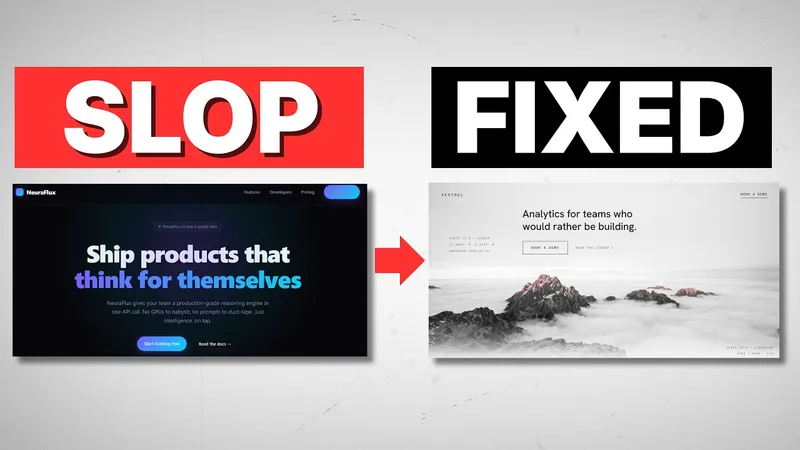
“I'm going to teach you how to defeat the monster known as AI slop in three simple steps. Now, AI slop has taken a number of forms over the years, and it wasn't too long ago that it looked something like this. A generic SaaS template with Inter font everywhere and blue purple gradients. But now, AI slop looks something like this. This is definitely better, but it still screams AI. It has a specific color palette, a specific font, just a general style that right away you can tell this was generated in just a prompt or two. But today, I'm going to show you how to break out of this mold. I'm going to teach you how to cultivate and inject your own taste into the web design process. I'm going to show you what sort of skills and MCPs you need to begin using to help you in that endeavor. And lastly, I'm going to show you the exact sort of build sequence you need to begin applying to this. What are the prompts we should be using? How should we be prototyping? What does it mean to iterate and tweak our web design until we get something we actually like? And by the end, you're going to have a flexible roadmap that you can apply to all of your AI design work. So, let's get started.”
- 01Promise and identify the problem
This states the episode’s central practical premise immediately and establishes the problem the method is meant to address.
The speaker promises to teach a three-step method for improving generic AI-generated work.
“I'm going to teach you how to defeat the monster known as AI slop in three simple steps.”
- 02Contrast the old and current problem
The contrast makes the problem more specific than simply poor quality: even improved results still lack a distinctive point of view.
The speaker gives a brief history of how the problem appeared, describes an older generic example and says a newer version is better but still recognizably generic.
“Now, AI slop has taken a number of forms over the years, and it wasn't too long ago that it looked something like this. A generic SaaS template with Inter font everywhere and blue purple gradients. But now, AI slop looks something like this. This is definitely better, but it still screams AI. It has a specific color palette, a specific font, just a general style that right away you can tell this was generated in just a prompt or two.”
- 03State the alternative and preview the route
This turns the critique into a proposed approach, previews the episode’s stages, and makes the promised takeaway clear before the first step begins.
The speaker promises to break out of the generic mold by developing personal taste, using relevant skills and tools, and following a build sequence. Questions about prompting, prototyping, and iteration lead into a promise of a flexible roadmap.
“But today, I'm going to show you how to break out of this mold. I'm going to teach you how to cultivate and inject your own taste into the web design process. I'm going to show you what sort of skills and MCPs you need to begin using to help you in that endeavor. And lastly, I'm going to show you the exact sort of build sequence you need to begin applying to this. What are the prompts we should be using? How should we be prototyping? What does it mean to iterate and tweak our web design until we get something we actually like? And by the end, you're going to have a flexible roadmap that you can apply to all of your AI design work. So, let's get started.”